Library App News
We are now using a library app which closely integrates with our library catalogue.
Everything you need in one place :
- Search the catalogue
- Renew and reserve your items
- Find your next read
- Learn something new

https://play.google.com/store/apps/details?id=com.cityofmelbourne.libraries&hl=en

https://apps.apple.com/au/app/city-of-melbourne-library-app/id6763532776
Need help?
- Call 1800 695 427, email library@melbourne.vic.gov.au, or visit our contact us page
App preview
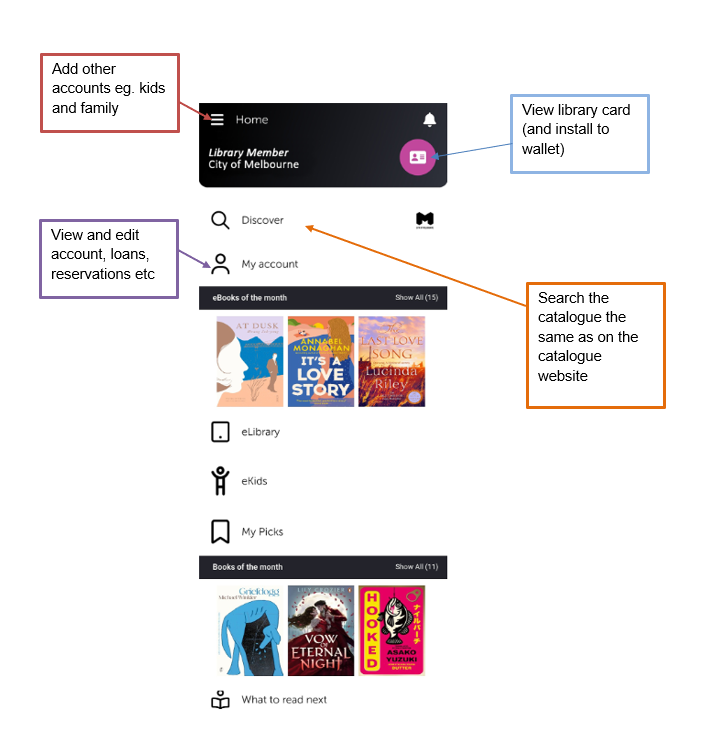
This app is being actively developed by Civica, our library system vendor and functionality will improve over time. Below is a list of known limitations, "bugs" and FIXES that we are aware of.
Please contact us if you become aware of any others.
- Borrower reading lists from the old app were not able to be automatically moved to the new app. To add titles to "Your List" in the new app, select the bookmark flag next to the title. You can view the list by clicking on "your lists" in the app. You can create new lists using the small blue "bookmark" style icon.
- The app works on Android phones that are on Android version 10+ and above which was released in 2019. Please contact us if your device is less than five years old and the app stores states it is not compatible.
- Some users have experienced difficulty in logging into the new app. Please first try resetting your password - if you continue to have a problem please contact us and we will do what we can to help
- FIXED 17/09/2026 - Some of the records we have in our catalogue have an "Access resource" button that when pressed, opens your browser and takes you to our catalogue with an error saying "you must be logged in to view this". If you log into the catalogue again using the hamburger navigation in the top right, the link will open. This is a bug and will be fixed.
- FIXED 17/09/2026 - Library App notifications are now available for reservations and overdue reminders. Make sure you enable them in your phone's notification settings.
- The app does not use native Android navigation such as using the back button. Please use the onscreen navigation.
- FIXED 17/09/2026 - Some "tick boxes" were not responding to touch. Particularly when viewing loans and reservations. This has been corrected.